HARMONIC insight
Two flagship products · 47 languages · BYOK · Local processing

Two desktop apps for multilingual work.

Insight Training Studio turns slides into 47-language narrated training videos.Insight Doc Translator translates Office files in 47 languages with layout intact.Two separate apps. Sold and licensed independently. Bring your own AI keys.

Local processing·SCORM 1.2 export (Training Studio)·All features, every plan

Two distinct products · sold and licensed independently

Pick one, or use both. Each ships standalone.

Insight Training Studio and Insight Doc Translator are two separate desktop apps with their own installers, licenses, and pricing. Each block below includes its own product demo video.

Product 1 of 2 · Insight Training Studio

Insight Training Studio

PowerPoint to multilingual training video, on your desktop.

Latest release · v1.0.8 (2026-06-05)

Speaker notes become AI narration. Slides become MP4. Screen recordings become tutorial manuals. Scripts become podcast episodes. Insight Training Studio is the all-in-one content studio that turns the work you already do into broadcast-quality training material — in 47 languages, on your PC, with no editor in the loop.

  • PowerPoint or PDF → narrated MP4 — Speaker notes become AI narration automatically. No voice actor, no studio, no editor in the loop.
  • 47-language AI narration — Edge Neural TTS delivers near-human voices across all 47 languages. Localize a global onboarding deck without re-recording a single slide.
  • Three TTS engines + ElevenLabs — Cloud (Edge Neural) + offline (VOICEVOX, Windows OneCore). ElevenLabs voice cloning via BYOK for branded narrators.
  • Three ways to add narration — AI voice (47 languages), record your own voice in-app (per scene), or import existing WAV/MP3. Mix and match per scene — founder message in real voice, the rest in AI.
  • Screen recording → tutorial / manual — Capture on-screen actions, AI converts to documented tutorial slides with auto-narration. Perfect for SaaS onboarding and IT manuals.

Insight Training Studio — dedicated product demo

Product 2 of 2 · Insight Doc Translator

Insight Doc Translator

Four kinds of work. One Office file. Layout intact.

Latest release · v1.0.4 (2026-05-03)

DeepL for translation, ChatGPT for simplification, Acrobat for PDFs — Insight Doc Translator does all of it on one file, with your layout fully preserved.

  • 47 languages, 6 AI engines — DeepL · Google · Azure · Claude · Gemini · OpenAI. Switch per file or per row.
  • Four operations on one file — Translate · Simplify (CEFR / JLPT / HSK / TOPIK) · Summarize · Refine to formal tone.
  • Layout stays intact — Fonts, tables, images, embedded objects — preserved exactly as the original.
  • Glossary + translation memory — CSV/Excel + DeepL Glossary sync, TMX standard. CAT-tool features in a drag-and-drop UI.
  • Use your own AI keys (BYOK) — Bring keys for any of the six engines. Several engines (DeepL, Google, Gemini) offer free monthly quotas you can tap before paid usage.

Insight Doc Translator — dedicated product demo

By the numbers

47 languages
English to Burmese, and everything in between
6 AI engines
DeepL · Google · Azure · Claude · Gemini · OpenAI
4 file formats
PPTX · PDF · DOCX · XLSX
Your AI keys
BYOK — direct billing, not ours
Local-first
your file never goes to the cloud

Why people trust us

Built around your data, your control.

Local processing
Your file never leaves your machine
Use your own AI keys
DeepL and OpenAI bill you directly (BYOK)
Built in Tokyo
Independent. No VC. No fake urgency.
Free trial
Full features, no credit card
Tax + invoicing covered
Lemon Squeezy handles tax and invoices globally
All features. One price.
$199/year, $499/seat business — no tiers

The problem

Your current workflow is broken on purpose.

Every tool solves one piece. None of them respect your layout. You become the integration layer — and you spend half your day cleaning up.

Step 1
DeepL
Translate the slide
Layout breaks. Tables collapse. Fonts change.
Step 2
ChatGPT
Simplify the language
Format gone. Have to rebuild from text dump.
Step 3
Acrobat
Open the PDF
Terminology slips. Glossary not enforced.
Step 4
PowerPoint
Manually fix everything
Two hours per file. Every. Single. Time.
We built one app for all of it. Layout intact.

Inside Insight Training Studio · Two input modes (one product)

Within Training Studio:One app, two input modes.

Both modes below are features inside Insight Training Studio — they are not separate products. (For the other product, Insight Doc Translator, see the section above.)

Entry A

Drop a deck. Get a video.

PowerPoint or PDF in. 47-language training video out.

  • Speaker notes auto-become the AI narration script
  • Three narration modes: AI voice (47 lang) · in-app recording · WAV/MP3 import — mix per scene
  • Picture-in-picture overlay for presenter or sign language
  • Subtitles, BGM, transitions, thumbnails — all built in
Best for
L&D · HR · global onboarding · accessibility
PowerPoint → multilingual MP4
Entry B

Record a screen. Get a manual.

Screen recording + step capture in. Captioned tutorial out.

  • Captures clicks and on-screen actions step by step
  • AI generates subtitles and chapter markers automatically
  • Same 47 languages — turn one recording into a global manual
  • Narrate in your own voice (in-app recording) or AI — per scene
  • Output as video tutorial or step-by-step PDF documentation
Best for
SaaS onboarding · IT manuals · DevRel · customer success
Screen recording → Captioned tutorial

Shared pipeline: both entries land in the same export — MP4, WAV, MP3, or SCORM 1.2 LMS package. Verified with Moodle and SCORM Cloud.

How it works

Three steps. Zero post-editing.

We obsessed over the workflow so you don't have to. Drop, choose, ship.

01

Drop your file

Drag a PowerPoint, PDF, Word, or Excel file onto the app window. Detection is automatic.

quarterly_report.pptx
128 slides · 2.3 MB
.pptx.pdf.docx.xlsx
02

Choose your operation

Translate, Simplify, Summarize, or Refine. Pick a language and engine. Switch per row if you need to.

🌐Translate
🌱Simplify (CEFR A1/A2)
Summarize (½ length)
🎩Refine (formal tone)
Engine:DeepL · ja → en
03

Get clean output

Layout intact. Fonts intact. Tables intact. Save the file. Share it. Done.

quarterly_report_en.pptx
128 slides translated · 2.4 MB
Fonts preserved
Layout intact
Tables, images, embedded objects: all kept
Total time: ~3 minutes

Product tour

Real screens. Real translations.

Real screenshots of the actual app — captured while a Tokyo team translates Japanese decks into English. No mockups, no marketing illustrations. This is the real product.

Insight Doc Translator

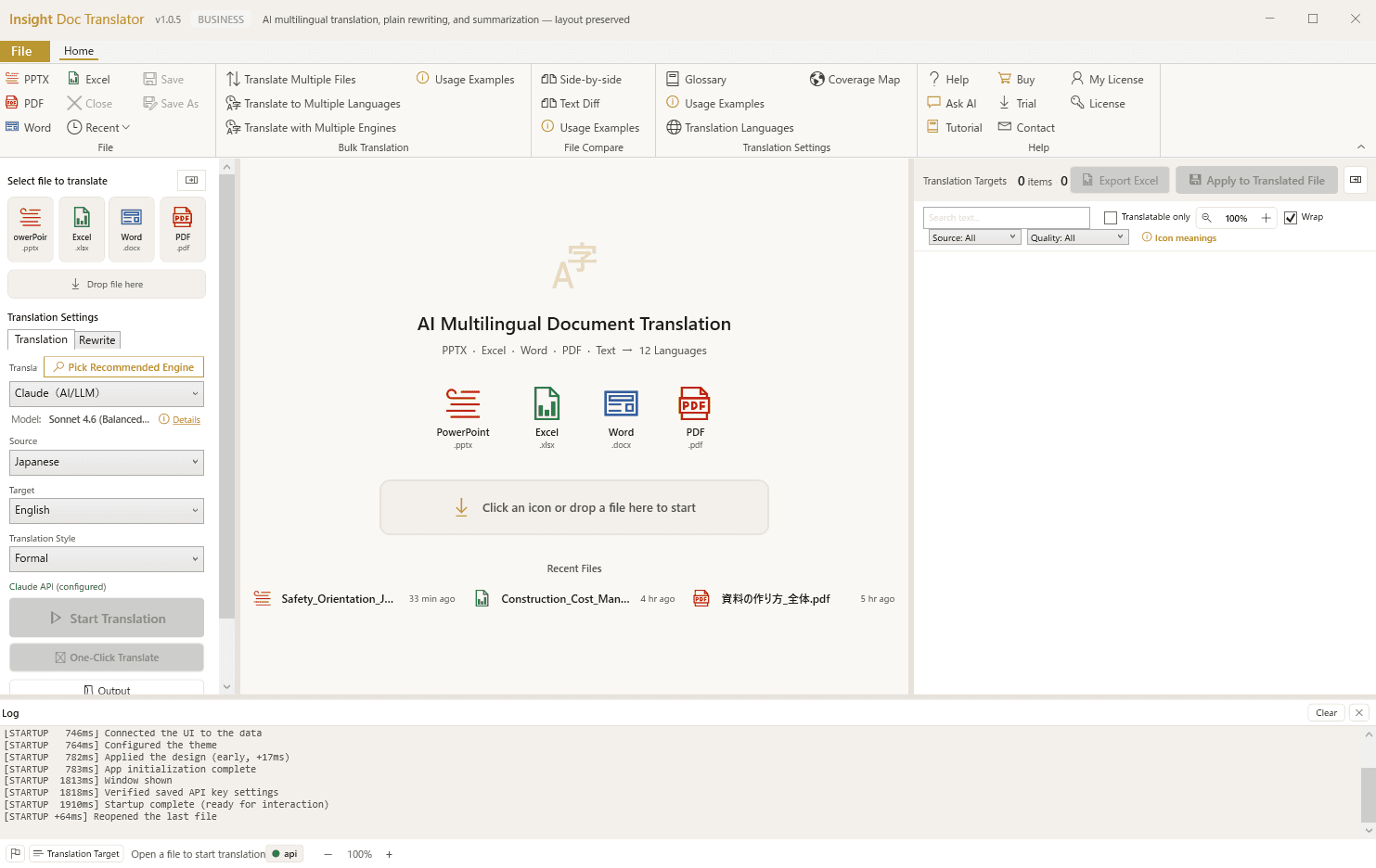
Drop the file. We'll handle it.

Drag in PowerPoint, Excel, Word, or PDF. Recent files appear inline. Pick a target language. That's the entire onboarding.

Insight Doc Translator top screen — drag-and-drop area for PPTX, Excel, Word, and PDF files
Insight Doc Translator

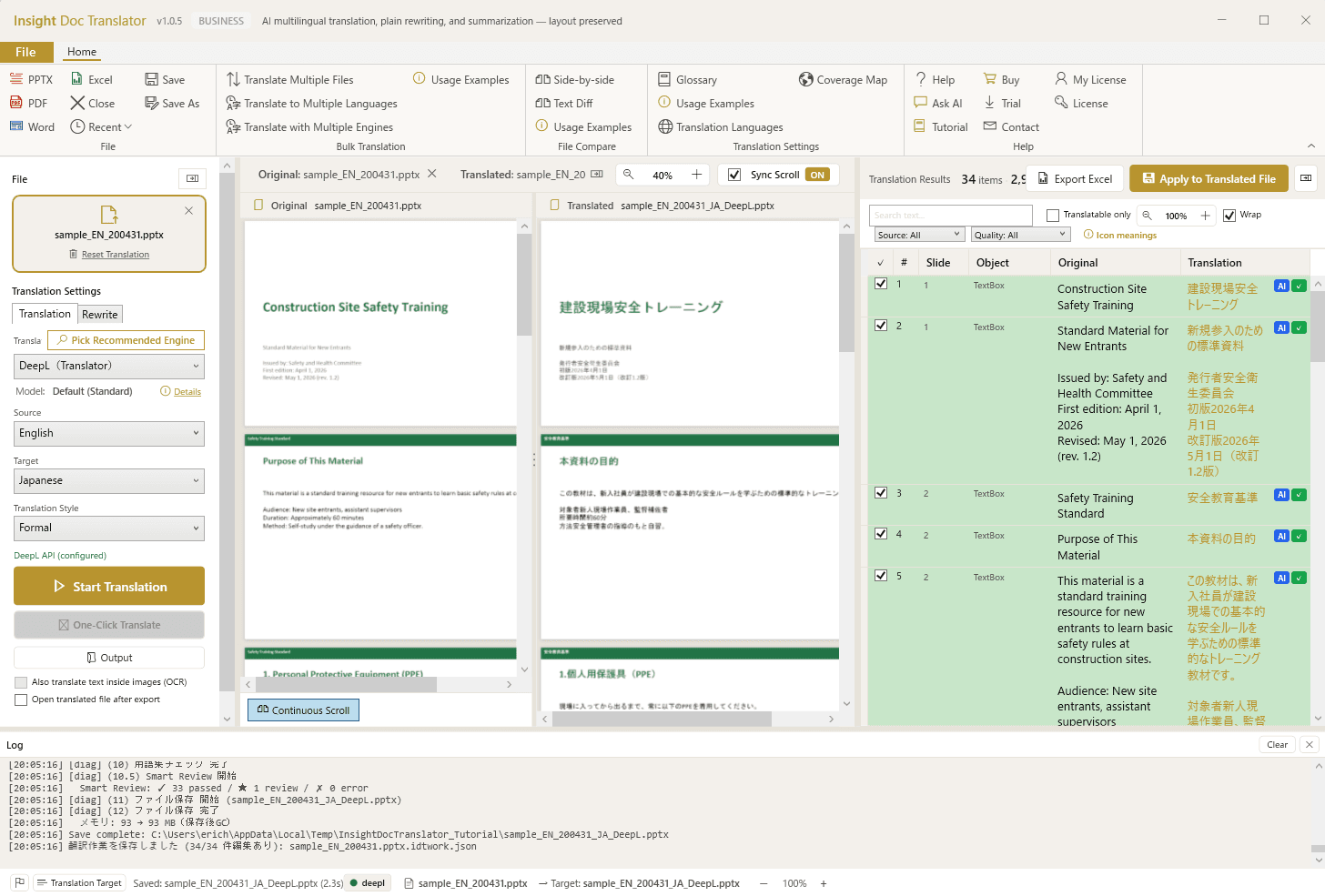
Translate slide-by-slide with full context.

Source on the left, draft translation on the right, AI suggestions on the far right. Edit any segment, swap engines per row, accept or revise — all without leaving the Office layout.

PowerPoint translation workspace with side-by-side source, target, and AI suggestion panels
Insight Doc Translator

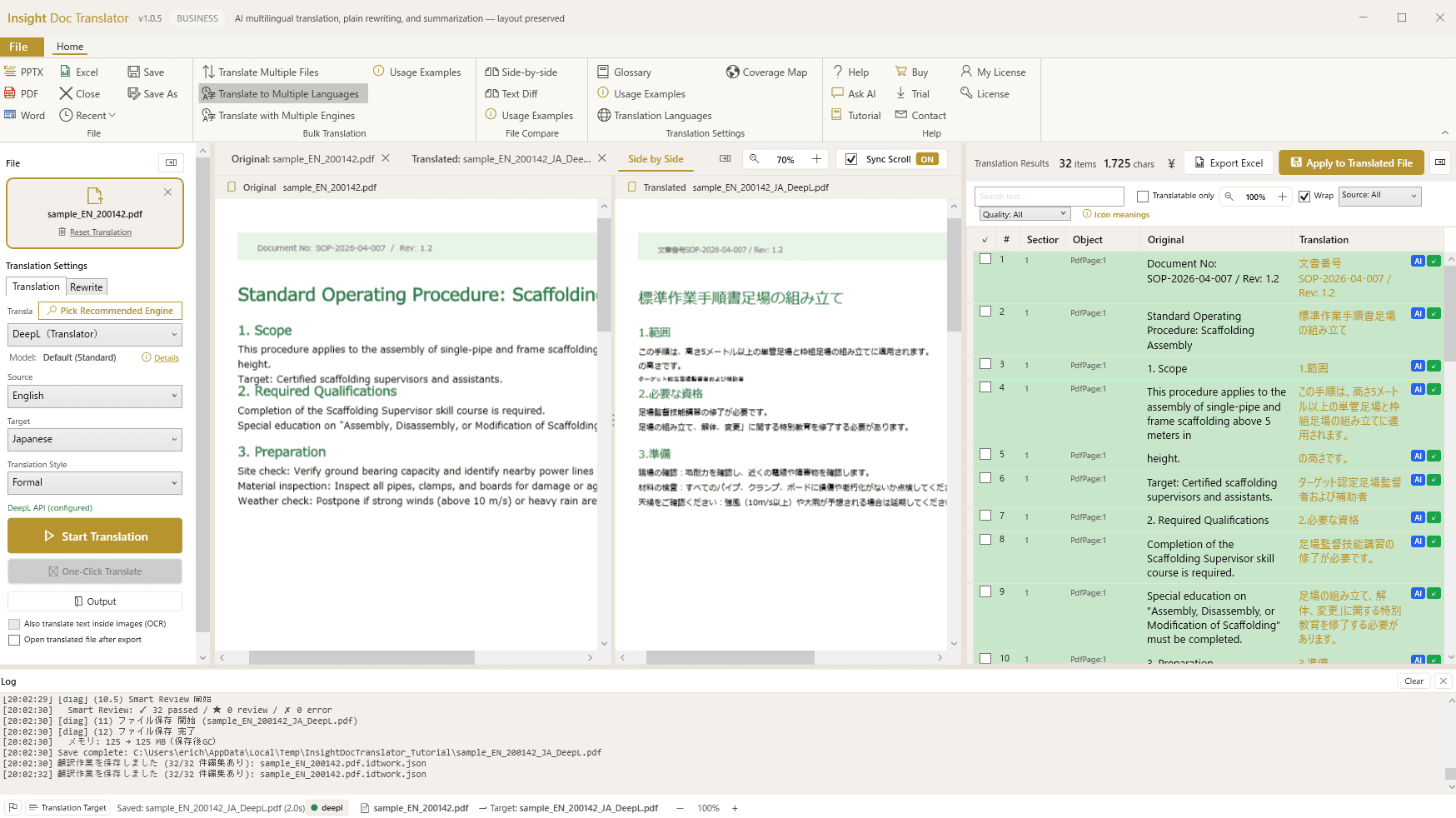
Review the translation against the original.

PDFs render fully on the left, with the translation broken into segments on the right. Edit any segment in place, and apply changes back into a clean output PDF when you're done.

Insight Doc Translator reviewing a Standard Operating Procedure PDF with the translated segments alongside
Insight Doc Translator

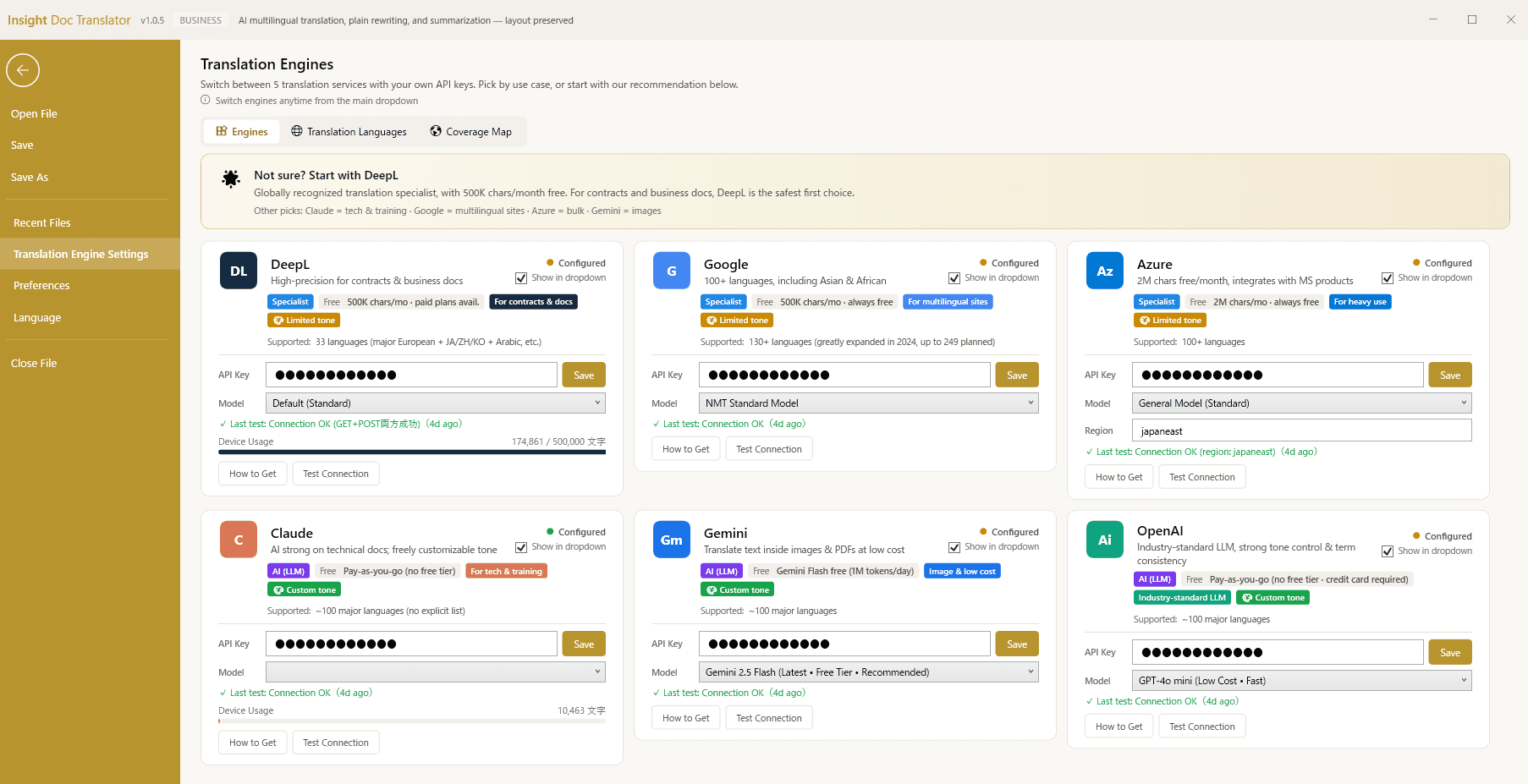
Six engines. Configured once. Switch anytime.

DeepL, Google, Azure, Claude, Gemini, and OpenAI — each with its own strengths, all in one panel. Drop in your API keys (BYOK), pick a default, and switch engines per file or per row whenever the content calls for it.

Translation Engines settings page showing DeepL, Google, Azure, Claude, Gemini, and OpenAI configured side by side
Insight Training Studio

Your speaker notes become AI narration.

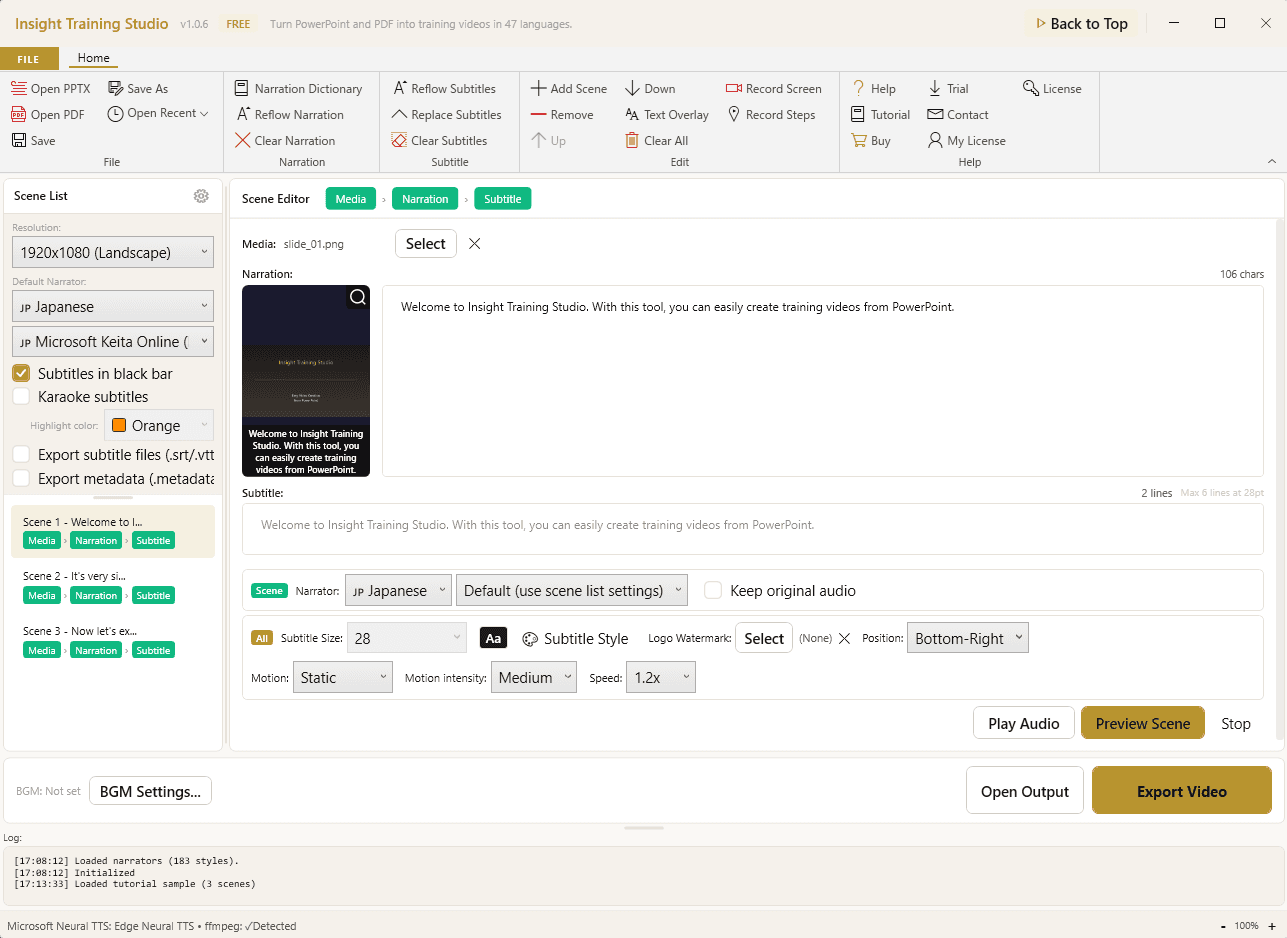
Each slide becomes a scene. Notes become voice-over. Edit narration, switch voices, drop in BGM, set captions — everything in one editor, no video tool required.

Insight Training Studio editor with scene list, narration text, voice and subtitle controls
Insight Training Studio

Pick your voice. Cloud, offline, or studio-grade.

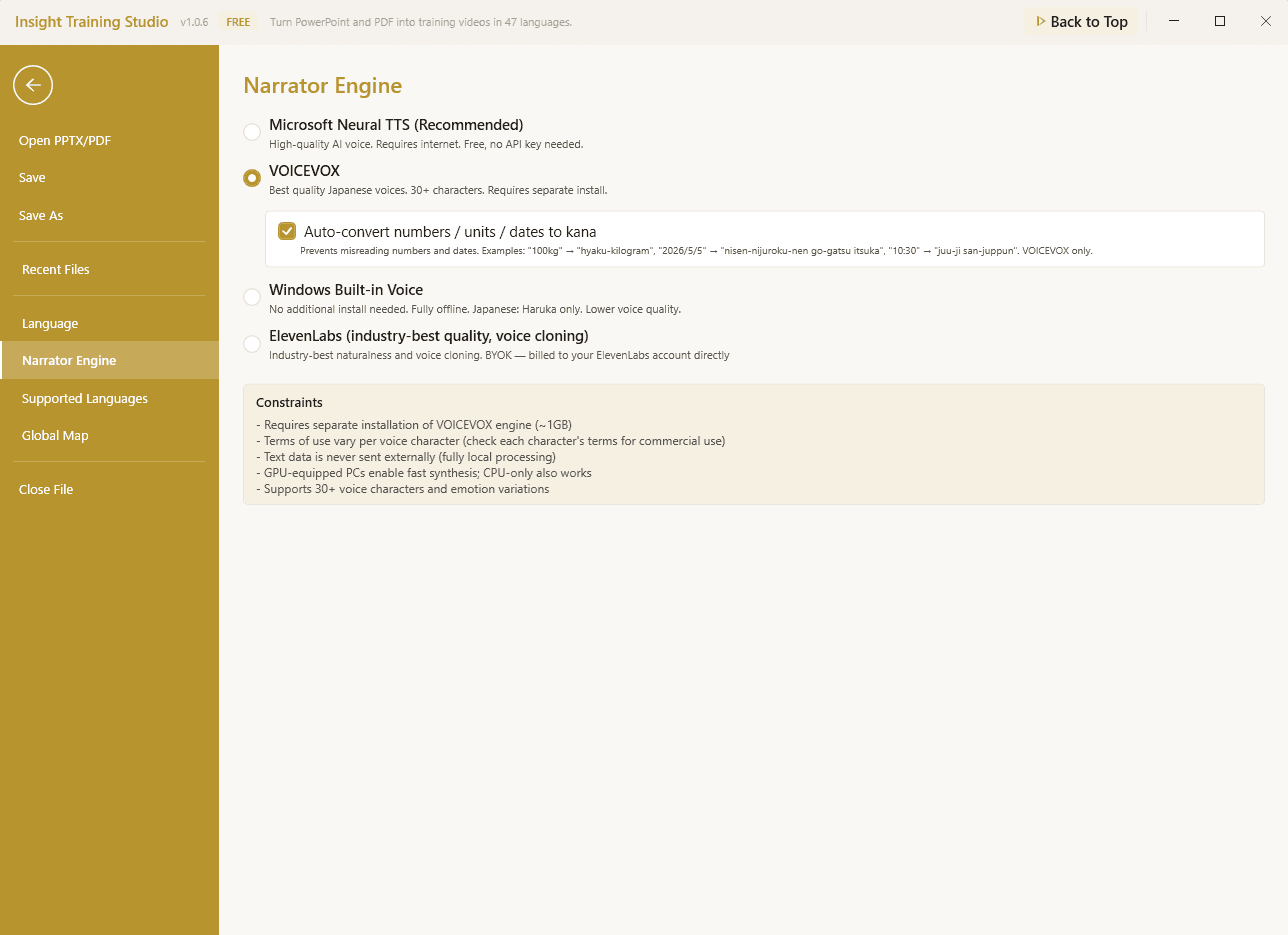
Microsoft Neural TTS for everyday narration, VOICEVOX for studio-quality Japanese voices, Windows built-in for fully offline runs, or ElevenLabs for industry-best naturalness with voice cloning. Switch per scene.

Narrator Engine settings showing Microsoft Neural TTS, VOICEVOX, Windows built-in voice, and ElevenLabs as TTS options

Two flagship products

Built for the work you actually do.

Pick the tool that solves your daily friction. Or grab both — they share licensing, glossary, and design conventions.

🌐
INST

Insight Doc Translator

Four kinds of work. One Office file. Layout intact.

Latest release · v1.0.4 (2026-05-03)

DeepL for translation, ChatGPT for simplification, Acrobat for PDFs — Insight Doc Translator does all of it on one file, with your layout fully preserved.

  • 47 languages, 6 AI enginesDeepL · Google · Azure · Claude · Gemini · OpenAI. Switch per file or per row.
  • Four operations on one fileTranslate · Simplify (CEFR / JLPT / HSK / TOPIK) · Summarize · Refine to formal tone.
  • Layout stays intactFonts, tables, images, embedded objects — preserved exactly as the original.
  • Glossary + translation memoryCSV/Excel + DeepL Glossary sync, TMX standard. CAT-tool features in a drag-and-drop UI.
Best for
  • ·Localization specialists tired of post-editing layout breaks
  • ·Knowledge workers translating proposals, reports, contracts
  • ·Educators creating multilingual training materials
🎬
INMV

Insight Training Studio

PowerPoint to multilingual training video, on your desktop.

Latest release · v1.0.8 (2026-06-05)

Speaker notes become AI narration. Slides become MP4. Screen recordings become tutorial manuals. Scripts become podcast episodes. Insight Training Studio is the all-in-one content studio that turns the work you already do into broadcast-quality training material — in 47 languages, on your PC, with no editor in the loop.

  • PowerPoint or PDF → narrated MP4Speaker notes become AI narration automatically. No voice actor, no studio, no editor in the loop.
  • 47-language AI narrationEdge Neural TTS delivers near-human voices across all 47 languages. Localize a global onboarding deck without re-recording a single slide.
  • Three TTS engines + ElevenLabsCloud (Edge Neural) + offline (VOICEVOX, Windows OneCore). ElevenLabs voice cloning via BYOK for branded narrators.
  • Three ways to add narrationAI voice (47 languages), record your own voice in-app (per scene), or import existing WAV/MP3. Mix and match per scene — founder message in real voice, the rest in AI.
Best for
  • ·L&D and corporate training teams turning PowerPoint backlogs into video courses
  • ·Global organizations rolling out the same onboarding deck in 47 languages
  • ·SaaS customer success and onboarding teams turning screen recordings into multilingual tutorials

The toolkit

Everything you need. Nothing you don't.

Built from the ground up for knowledge workers who handle multilingual Office files every day.

47 languages, 6 AI engines (INST)

DeepL for European, Google for Asian and African, Claude for nuance, Gemini for cost. Switch per file or per row. Run multiple engines side-by-side to compare outputs.

Four operations on one file (INST)

Translate, simplify (CEFR / JLPT / HSK / TOPIK proficiency-aware), summarize to half length, refine to formal tone. Layout preserved through every operation.

Layout comes through untouched (INST)

Fonts, tables, images, embedded objects — preserved exactly. Drop in, choose your target language, get a clean output. Zero post-editing.

PowerPoint → multilingual MP4 (INMV)

Speaker notes become AI narration automatically. Drop in your deck, pick a language, get a finished training video. No voice actor, no studio, no editor.

Three ways to add narration (INMV)

AI voice in 47 languages, record your own voice in-app per scene, or import existing WAV/MP3. Mix and match within one video — founder message in real voice, the rest in AI. No competitor allows this.

Screen recording → tutorial (INMV)

Capture on-screen actions, AI converts to documented tutorial slides with auto-narration. Perfect for SaaS onboarding flows, software manuals, and IT training docs.

Podcast-ready audio export (INMV)

Same workflow, audio-only output. Generate WAV or MP3 podcast episodes from PPTX or scripts. Ready for Spotify, Apple Podcasts, or your internal corp comms feed.

Use your own AI keys (BYOK)

Bring keys for any of the six engines. Combined free tiers across DeepL, Google, and Azure run to about 3M characters per month — at no recurring cost.

Local processing — your files stay on your PC

No cloud upload, no data harvesting, no third-party retention. Contracts, HR docs, IP, and source decks never leave your device. IT review boards approve in days, not weeks.

Glossary + translation memory (INST)

CAT-tool features in a drag-and-drop UI. CSV/Excel import, DeepL Glossary sync, TMX standard. Glossary violations are flagged automatically as a QA pass.

Picture-in-picture overlay (INMV)

Drop in a presenter video, branded watermark, or sign-language interpreter. One overlay slot, fully positionable. Accessibility-ready when you need it — no separate editing pipeline.

SCORM 1.2 LMS export (INMV)

Drop your training video straight into Moodle, TalentLMS, Cornerstone, or any SCORM 1.2 LMS. Resume bookmark, review-mode protection, and pass-through completion built in. Verified with Moodle and SCORM Cloud (Rustici).

Use cases

Built for teams that ship across borders.

Whatever your industry — if your work crosses a language barrier, this is for you.

Software & SaaS💻

Ship product docs in any language, without a localization team

Your release notes, API docs, and pitch decks — translated and reformatted in minutes. Engineers stay shipping. Marketing stays on schedule.

47
languages, one workflow
Sales & Consulting📈

Send the same proposal to Tokyo, Singapore, and São Paulo

Translate a 60-slide pitch deck before the prospect call. Layout intact, brand fonts preserved, charts editable in PowerPoint.

<5 min
for a 60-slide deck
Legal & Compliance⚖️

Review foreign-language contracts in your own language first

Translate-then-summarize a 200-page agreement. Get a 2-page brief in your preferred tone — formal or plain language.

200 → 2
pages, in 8 minutes
Academic & Research🎓

Read papers in any language. Cite them in yours.

Drop a PDF preprint. Get a layout-preserving translation with formulas intact. Then summarize for your literature review.

PDF
with formulas preserved
HR & Internal Comms🤝

One handbook. Every employee reads it in their native tongue.

Translate company policies, training materials, and onboarding decks. Glossary keeps brand and legal terms consistent across runs.

1 source
→ all team languages
Finance & Audit📊

Translate Excel reports without breaking the formulas

Cell-by-cell translation that preserves =SUM(), =VLOOKUP(), and conditional formatting. Send English reports to your overseas board, in minutes.

0
broken formulas
L&D / Corporate Training🎬

Turn your PowerPoint backlog into a multilingual video library

Speaker notes become AI narration. The same source deck ships in 47 languages, no re-recording. New hires onboard faster — without the studio fee.

5 min
deck → finished MP4
Tech Writers & SaaS DevRel🛠️

Screen recording in. Documented tutorial out.

Capture the workflow once. AI converts it to step-by-step slides with auto-narration. Onboarding manuals, IT how-tos, product walkthroughs — without the deck-building afternoon.

1 capture
→ slides + narration + manual

vs Alternatives

One tool replaces three subscriptions.

Honest comparison — we mark the rows where competitors lead too. We don't claim to be best at everything; we claim to be the only one that does all of it on the same Office file, with your layout intact.

Feature
HARMONIC insight
Insight Doc Translator
DeepL Pro
ChatGPT Plus
MS Copilot
Office layout preserved (PPTX/DOCX/XLSX)
Multi-engine, switchable per row
6 engines
Claude/DeepL/Google/Azure/Gemini/OpenAI
Easy-language rewrite (CEFR/JLPT/HSK)
Manual prompting
Summarize with layout intact
Within MS only
Glossary + Translation Memory (TMX)
Glossary only
Local processing (file never uploaded)
BYOK (use your own AI keys)
Number of languages
47
33
Wide
General LLM
Wide
General LLM
Raw translation quality (linguistic only)
On par
Uses DeepL etc.
Excellent
Industry lead
Very good
Good
Conversational AI / chat
Native Office ribbon integration
Add-in
Free tier available
30-day trial
Limited GPT-4
Annual price
$199 / year
Annual subscription · all updates included
$108 / year
Subscription
$240 / year
Plus plan
$360 / year
Requires MS 365

Pricing reflects published rates as of 2026. DeepL/ChatGPT/Microsoft are trademarks of their respective companies. We respect the work they do — we just think one app for one file is a better workflow.

Early access feedback

What early users are saying.

From sales teams, designers, and ops leads who got their workflows back.

We used to send PowerPoints to a translation agency and wait three days. Now I drop the file at lunch and email the deck before I'm done with my coffee.
M
Marcus T.
VP of Sales · enterprise SaaS
What sold me was the layout. Other tools turn my deck into a wall of text. This one keeps the charts, the tables, the brand fonts — exactly as I built them.
Y
Yuki S.
Product designer · Tokyo
I was skeptical about the BYOK model — turns out it saves us money. We already pay for OpenAI; why pay another vendor for the same tokens?
P
Priya K.
Operations lead · fintech

Composite quotes from early-access user interviews · Names changed for privacy

Why we built this

Every translator we know hated their workflow.

We watched a colleague spend an entire Saturday translating a 60-slide deck for a Monday board meeting. Copy, paste, translate, paste back, fix the layout, fix the font, fix the chart that wrapped wrong. Repeat 60 times.

That Saturday became this app — and the Mondays that followed.

No subscriptions. No data lock-in. Use your own DeepL or OpenAI key — we never see your text. Pay once. That's it.

HARMONIC insight founder
Founder, HARMONIC insight
Tokyo, Japan · est. August 2025

Our principles

  • Your data stays yours
    We never see your files or text. The app talks directly to DeepL or OpenAI from your machine, with your own API key.
  • One price. All features.
    Annual per-device license. No upgrade tiers. No "Plus" or "Pro" upsells. The price is the price.
  • Layouts come through untouched
    Fonts, tables, formulas, embedded objects — preserved bit-for-bit. Your finished file looks like your source file.
  • Sound like a person
    Outputs adjust to register: friendly emails, formal contracts, plain-language briefings — never a translation artifact.

Pricing

One price. All features.

Annual license. No tiers, no upsells, no surprise charges. AI usage is billed by DeepL or OpenAI directly to you — never to us. Cancel anytime.

🌐Insight Doc Translator

Four kinds of work. One Office file. Layout intact.

30-day free trial →
Personal
For individual creators
$199/year
  • 1 device, all features unlocked
  • Use your own DeepL / OpenAI keys
  • Glossary + Translation Memory
  • Email support
Get Personal — $199
Most popular
Business
For teams that ship multilingual content
$499/seat/year
  • Multi-seat licensing for teams
  • Shared corporate glossary + TM
  • Batch processing across folders
  • Priority email support
Get Business — $499

🎬Insight Training Studio

PowerPoint to multilingual training video, on your desktop.

30-day free trial →
Personal
For individual creators
$199/year
  • 1 device, all features unlocked
  • Use your own DeepL / OpenAI keys
  • Glossary + Translation Memory
  • Email support
Get Personal — $199
Most popular
Business
For teams that ship multilingual content
$499/seat/year
  • Multi-seat licensing for teams
  • Shared corporate glossary + TM
  • Batch processing across folders
  • Priority email support
Get Business — $499

Prices are billed in USD. Lemon Squeezy converts to your local currency at checkout, and handles tax and invoices globally. 30-day refund, no questions asked. Looking for an enterprise plan or invoice billing? Contact us.

Stay in the loop

We'll email you when macOS lands.

One email per release. Product updates, new languages, new file formats. That's it. Unsubscribe anytime.

We email you about releases. That's all. Never shared, never sold. See our privacy policy.

FAQ

Questions, answered honestly.

If yours isn't here, email us at contact@h-insight.jp.

What does “use your own AI key” (BYOK) mean?
You bring your own API key from DeepL, Google, Azure, Claude, Gemini, or OpenAI. AI usage is billed by those providers directly to you, never to us — and most teams stay inside their providers’ free tiers (around 3M characters per month, combined). It keeps your AI costs transparent and under your control.
Where do my documents go?
Nowhere. The app runs on your PC, and only the text you choose to translate ever reaches an AI provider — using your own API key, billed directly to you. File structure, metadata, and unselected content never leave your machine.
What currency will I be charged in?
USD ($199 / $499). At checkout, Lemon Squeezy converts to your local currency at the current rate and handles tax and invoices in one step — whether you’re in the US, EU, UK, India, or anywhere else. Customers in Japan should use insight-office.com, which carries a separate JPY-priced tier.
What if it doesn’t work for me?
Start with the free trial — full features, no credit card required — so you can confirm it fits your workflow before you ever pay. For billing issues (defects or double charges) or to stop auto-renewal, just email support@h-insight.jp.
Does it work on macOS or Linux?
Built first for Windows — that’s where Office gets done. macOS is on the roadmap; sign up for the newsletter and we’ll email you when it lands.
How is this different from DeepL?
DeepL is excellent at the translation itself — we use it as one of our engines. The difference is what happens to the rest of your file. DeepL doesn’t preserve PowerPoint layouts well, can’t simplify or summarize, and locks you into one engine. We keep your layout intact, let you switch between six engines per row, and fold simplify, summarize, and refine into the same workflow.
Can I share licenses with my team?
Yes. Pick the Business plan ($499 per seat per year) and add as many seats as you need — one seat per device. Business also unlocks a shared glossary and translation memory across the team.
What languages does Simplify support?
Every target language can be rewritten to a lower proficiency level — CEFR for European languages, JLPT for Japanese, HSK for Chinese, TOPIK for Korean. The AI adjusts vocabulary and grammar to match the level you set (down to A1/A2).

One tool replaces three

One Office file. Every kind of work.

30-day trial. No credit card. No setup. Download, drop a file, and see what happens.

30-day refund, no questions askedUse your own AI keysLocal processing, no cloud upload